Why January goes wrong for the self-employed
1. The bill is bigger than expected
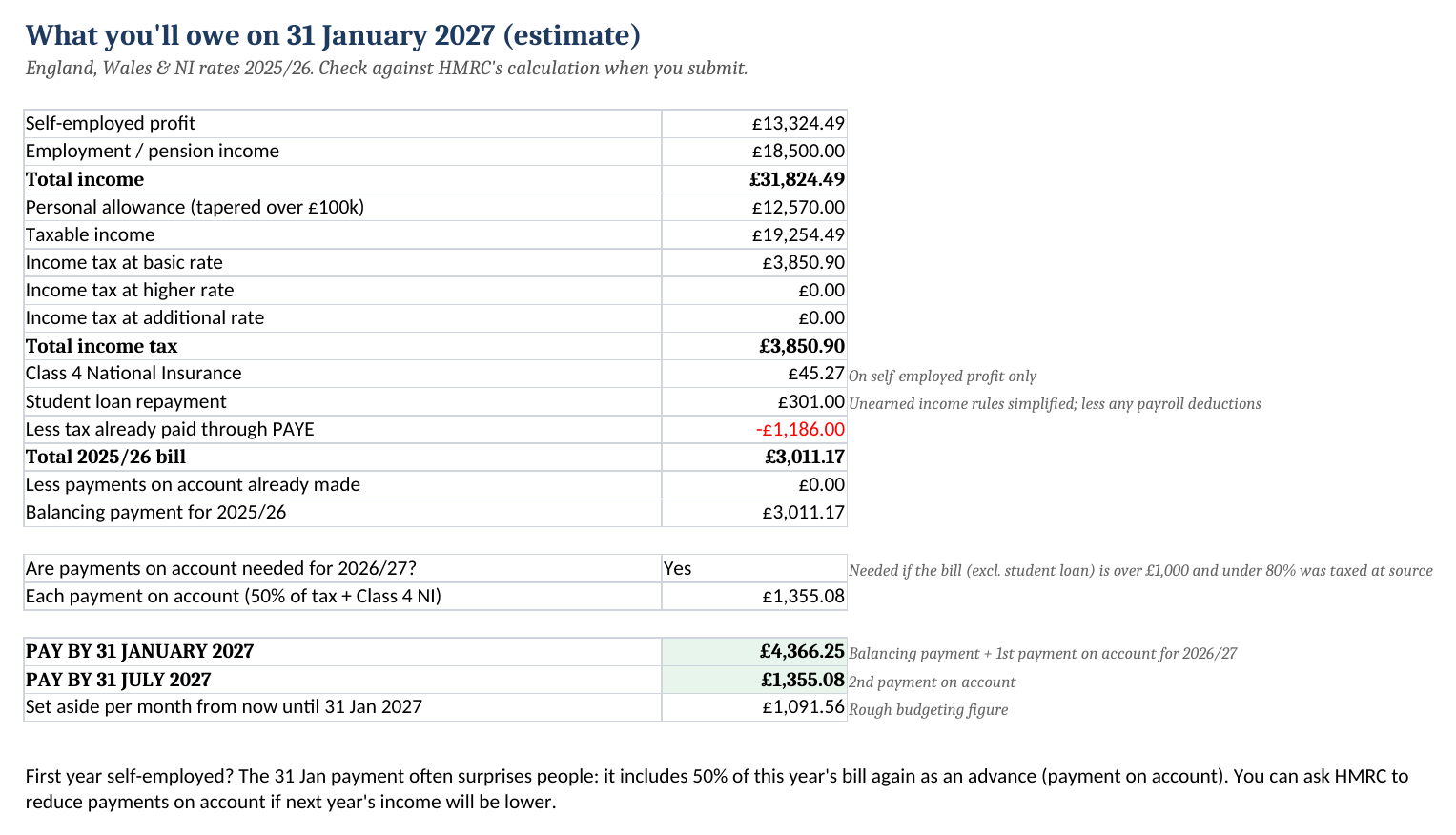
If you owe over £1,000, HMRC adds half of it again as an advance for next year. The Tax Estimate tab shows that figure up front, so 31 January isn't a shock.
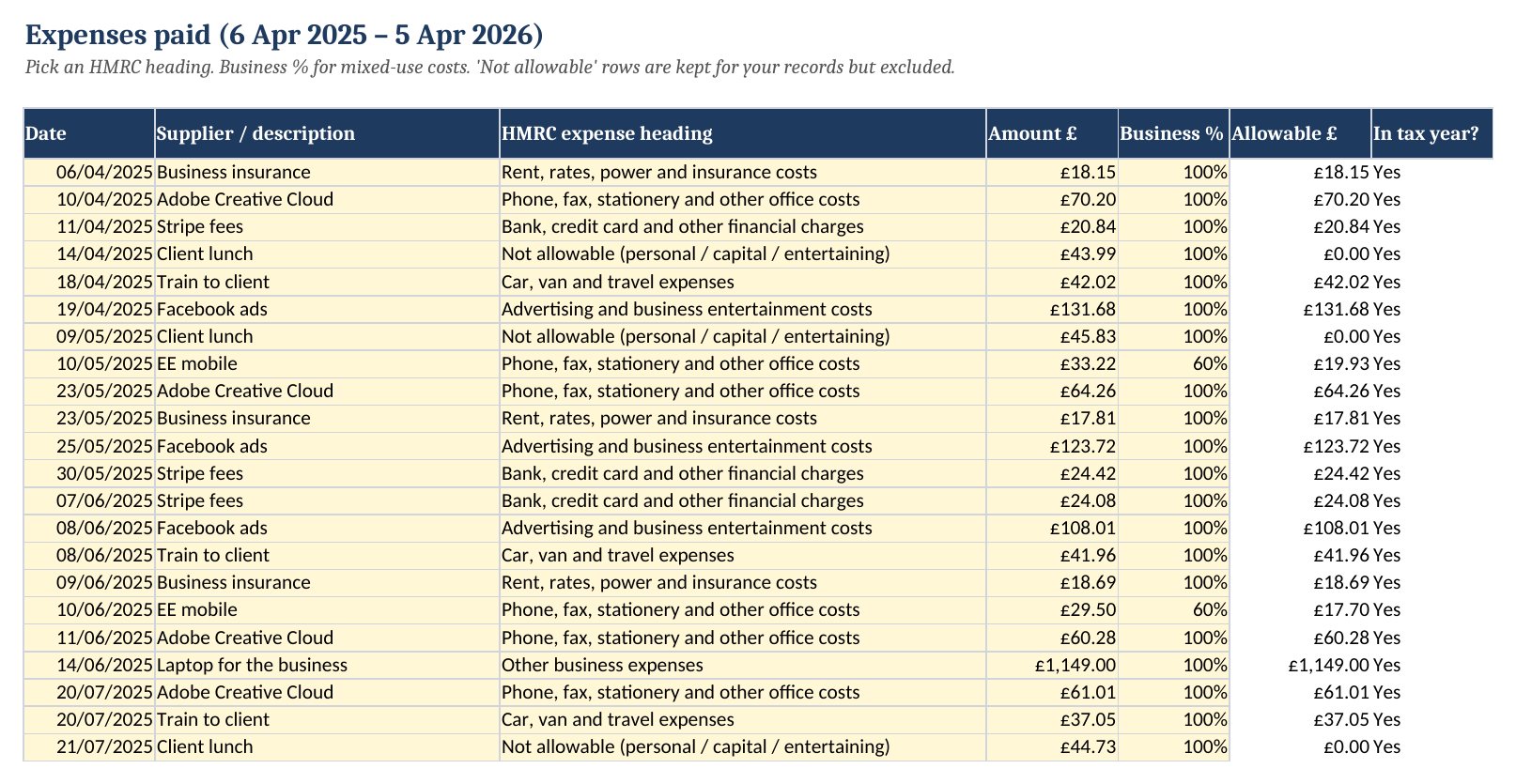
2. Expenses get missed or mis-filed
Every cost goes under one of HMRC's own headings, with a business-use % for your phone or broadband. Mileage and the working-from-home flat rate are worked out for you.
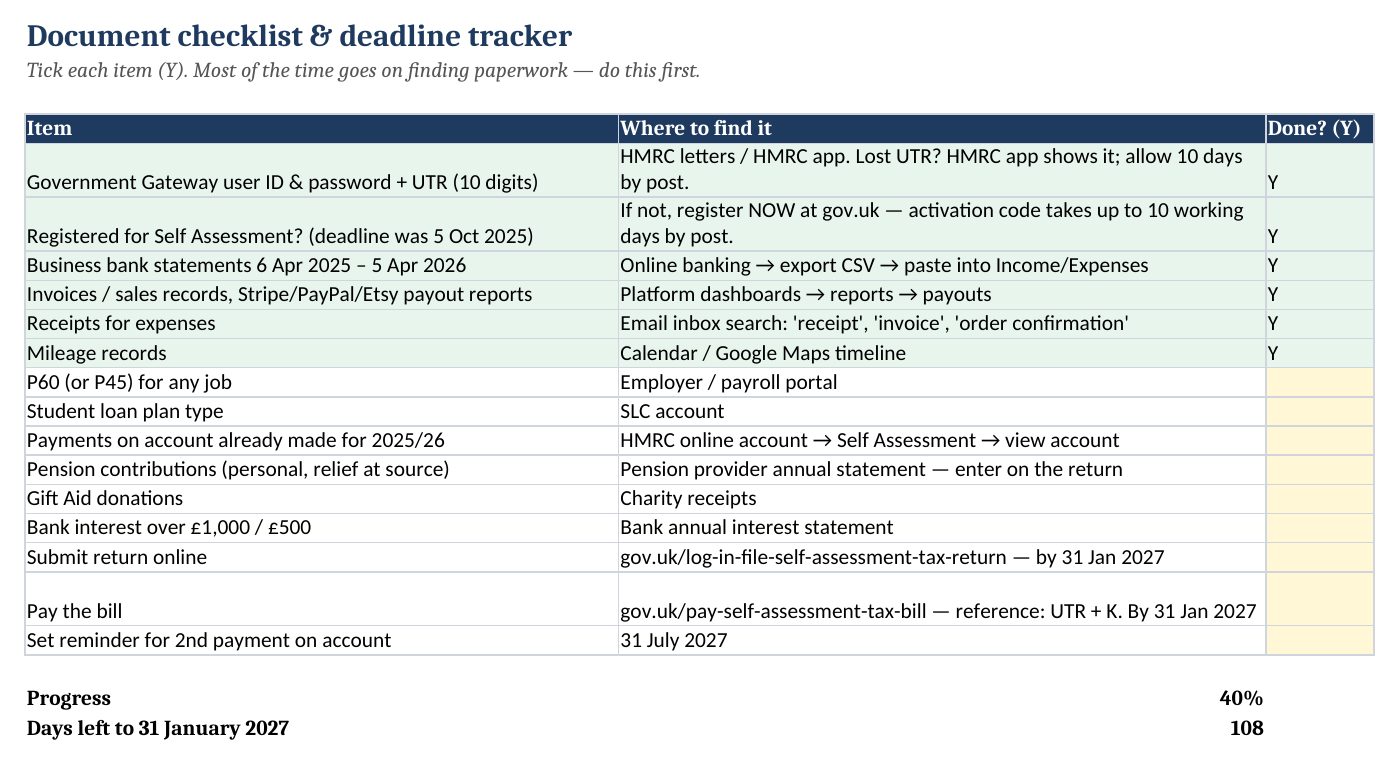
3. Hours lost hunting for paperwork
A checklist tells you what to find and where (UTR, Gateway login, P60, payout reports) before you open the return.
What's inside
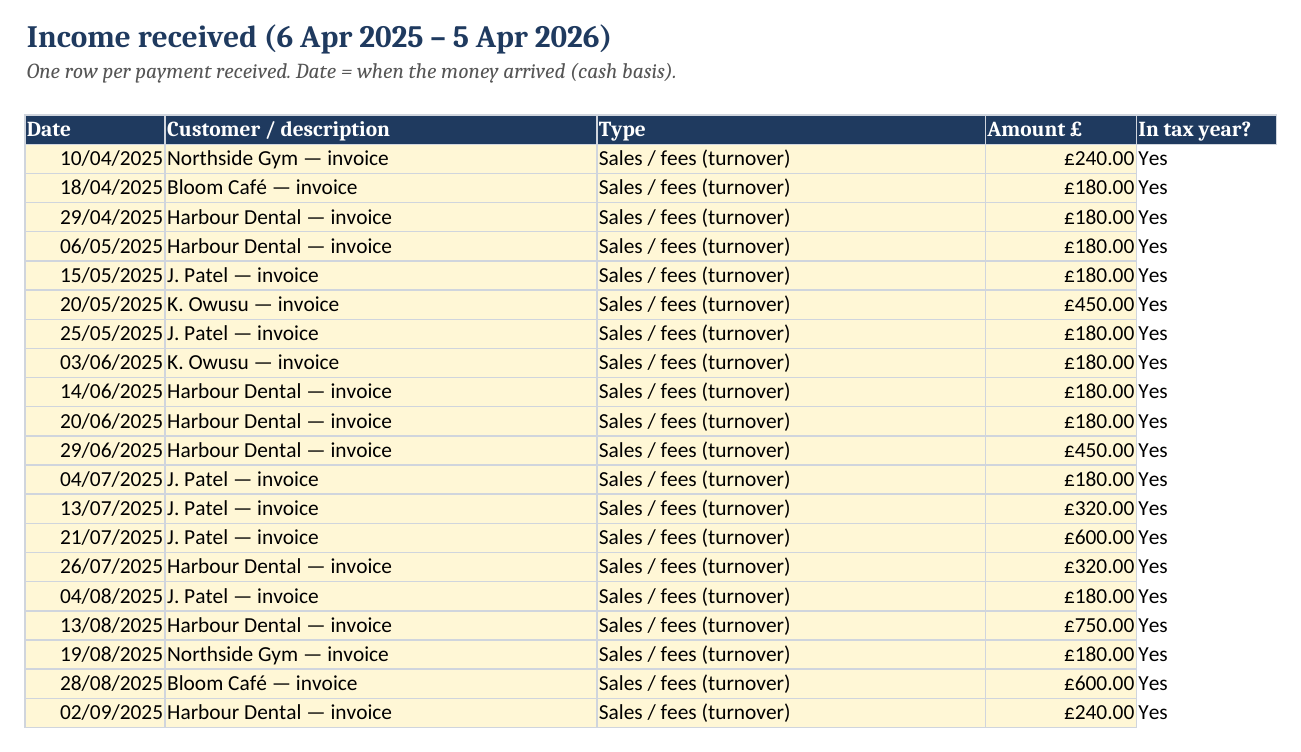
- Income and Expenses logs with 1,000 rows each and HMRC expense headings in a dropdown. Business-use % covers mixed costs, and any row dated outside 6 Apr 2025 – 5 Apr 2026 turns red
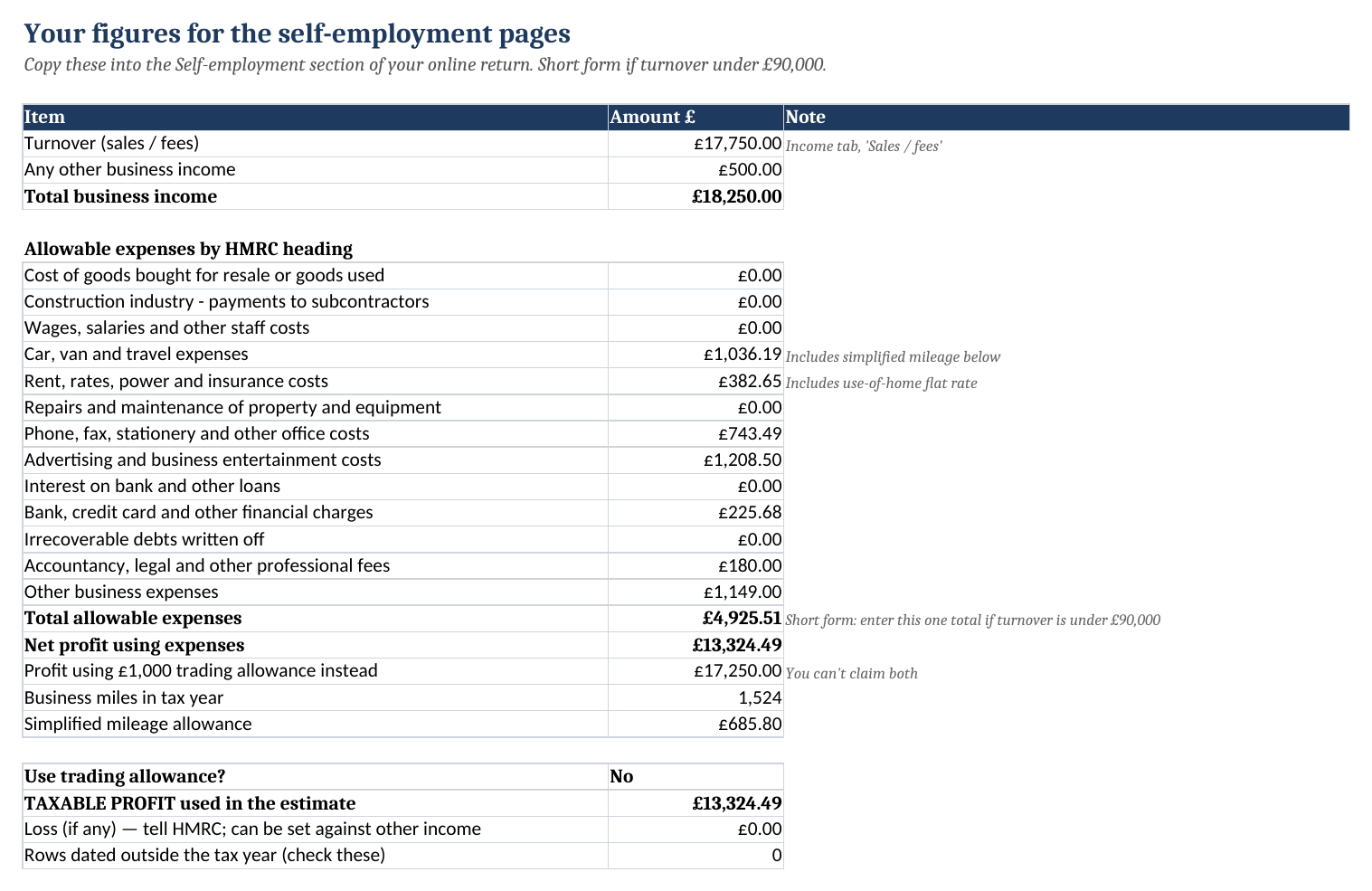
- Return Figures tab: turnover, other income, expenses under each heading, and the single total for the short form (turnover under £90,000)
- £1,000 trading allowance check: it picks whichever gives the lower profit, or you can choose
- Mileage log at 45p/25p, plus Use of Home at HMRC flat rates (£10/£18/£26 a month)
- Tax Estimate: income tax with a salary or pension alongside, Class 4 NI, student loan Plans 1, 2, 4 and 5 and Postgraduate, tax already paid via PAYE, and payments on account. It also shows what to pay on 31 Jan and 31 Jul 2027 and how much to put aside each month
- Document checklist with a countdown, plus a sample copy filled in for an example freelancer
How it works
- Tick off the checklist. Most of the time goes on finding your UTR, Gateway login and bank statements.
- Add your P60 figures and student loan plan on Settings.
- Paste or type your income and expenses for 6 April 2025 – 5 April 2026. Most people need 1–2 hours.
- Copy the Return Figures into HMRC's online return, and pay the amount shown on the Tax Estimate tab.
Worked example (from the sample file)
Sam is a freelance designer who also has a part-time job paying £18,500. Business income is £18,250 and allowable expenses come to £4,925.51, including 1,524 business miles (£685.80) and the working-from-home flat rate. A £46 client lunch is logged but correctly excluded. That gives a profit of £13,324.49, which beats the £1,000 trading allowance.
| Item | Amount |
|---|---|
| Income tax on total income (after £1,186 PAYE already paid) | £2,664.90 |
| Class 4 NI | £45.27 |
| Student loan (Plan 2) | £301.00 |
| Balancing payment for 2025/26 | £3,011.17 |
| + 1st payment on account for 2026/27 | £1,355.08 |
| Pay by 31 January 2027 | £4,366.25 |
| Pay by 31 July 2027 | £1,355.08 |
Who it's for
It's for UK sole traders, freelancers and side hustlers filing their own 2025/26 return, especially first-timers, people with a job as well, and anyone whose records are a pile of bank statements. It's not for partnerships or limited companies, and the estimate doesn't cover Scottish income tax bands, capital gains or foreign income. Landlords should use our landlord workbook for property income.
Get it
VAT included where applicable · one-off · instant download
- Blank workbook + filled-in sample (.xlsx)
- Google Sheets setup steps
- Free fixes for the 2025/26 return
- 14-day no-quibble refund
After payment you're taken straight to your download page. Stripe also emails a receipt.
FAQ
Does it file my tax return?
No. It organises your figures and estimates the bill. You then type the totals into HMRC's online Self Assessment, which is free to use at gov.uk.
Which tax year is this for?
2025/26, which runs from 6 April 2025 to 5 April 2026. That's the return due online by 31 January 2027.
What is a payment on account, and why is my bill so high?
If your bill is over £1,000 and less than 80% of your tax was taken at source, HMRC asks for two advance payments towards next year, each half of this year's bill. The first is due on 31 January together with this year's balance. The workbook calculates both.
I also have a job. Does it handle PAYE?
Yes. Enter your P60 pay and the tax already deducted. The estimate uses your combined income to work out the bands and takes off what PAYE already collected.
Should I use the £1,000 trading allowance?
If your expenses are under £1,000, usually yes. The workbook compares both options and picks the one that gives the lower profit, or you can override it.
Does it work in Google Sheets or on a Mac?
Yes. It works in Excel 2010 or later, Microsoft 365, Excel for Mac, Google Sheets and LibreOffice. There are no macros.
Is this tax advice?
No. It's a record-keeping and estimating tool using 2025/26 rates for England, Wales and Northern Ireland, and every rate can be edited. HMRC's calculation when you submit is the final figure.
What's your refund policy?
Email us within 14 days for a full refund. You don't need to give a reason.
More from GPT Shop
Refund policy
Email gptshop@mail.grokbot.com within 14 days of purchase and we'll refund you in full. You don't need to give a reason.