Why most landlord spreadsheets get MTD wrong
1. Quarters aren't cumulative
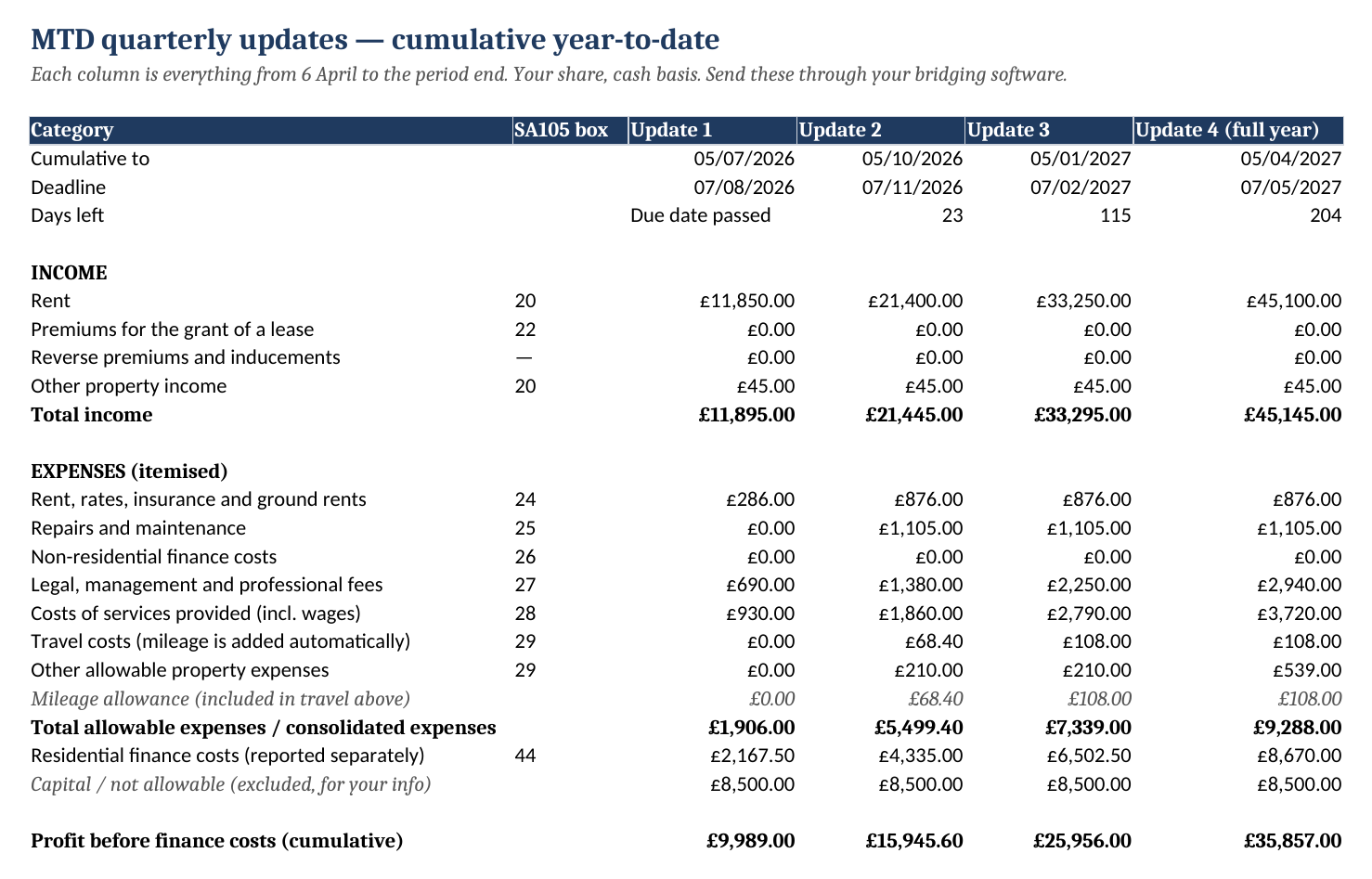
HMRC wants year-to-date totals. If your sheet sums July–October on its own, your November update is wrong even though it doesn't look wrong.
2. Mortgage interest gets deducted
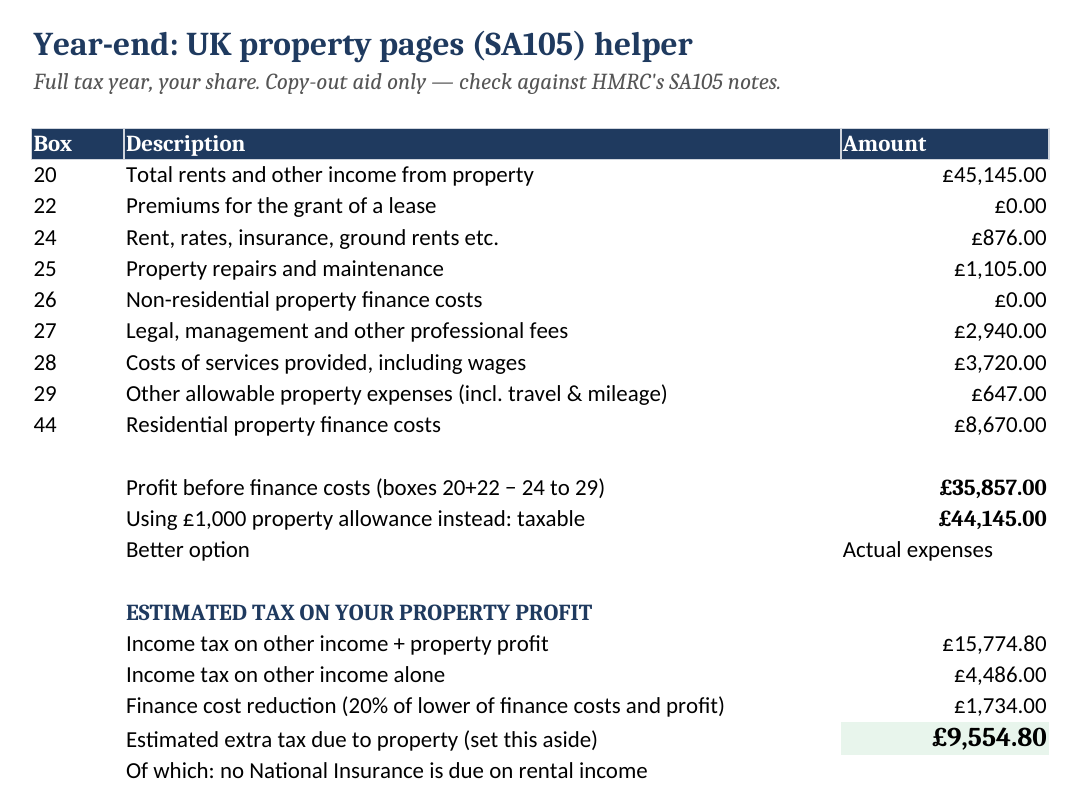
Under Section 24 it's a 20% tax reduction, not an expense. Here it has its own line (box 44) and the estimate treats it correctly.
3. Categories don't match HMRC's
Every dropdown is one of HMRC's UK property headings, so the figures match what your bridging software expects.
What's inside
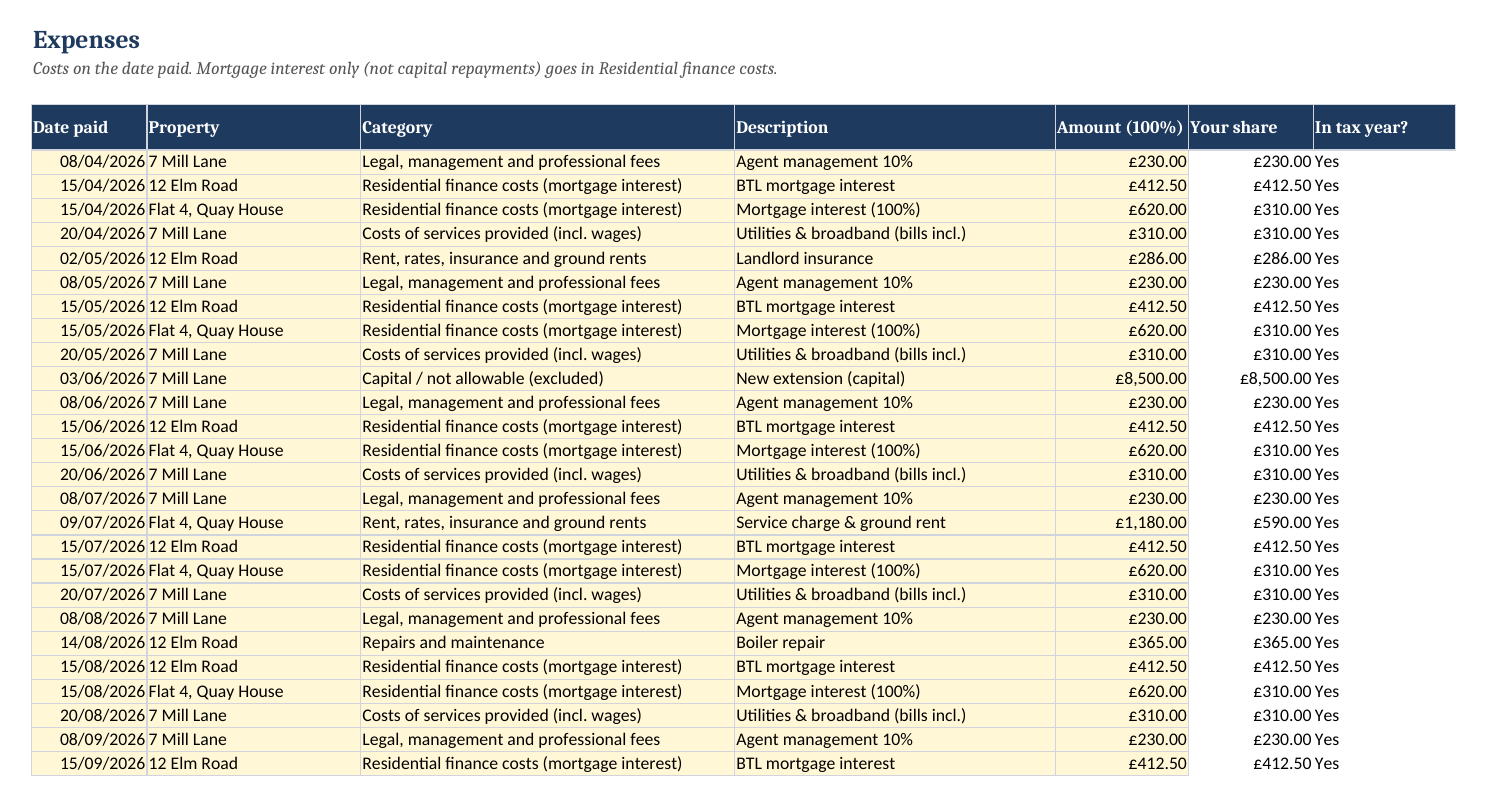
- Income and Expenses logs with 1,000 rows each, property and HMRC category dropdowns, a date check that flags anything outside the tax year, and automatic ownership-share calculation
- Quarterly tab: cumulative totals for all 4 MTD updates, the deadlines and days left, plus both itemised and consolidated expenses (you can use consolidated under £90k)
- SA105 helper: boxes 20, 22, 24–29 and 44, plus the £1,000 property allowance comparison
- Tax set-aside estimate: 2026/27 bands, personal allowance taper, finance cost reduction. Every rate is editable
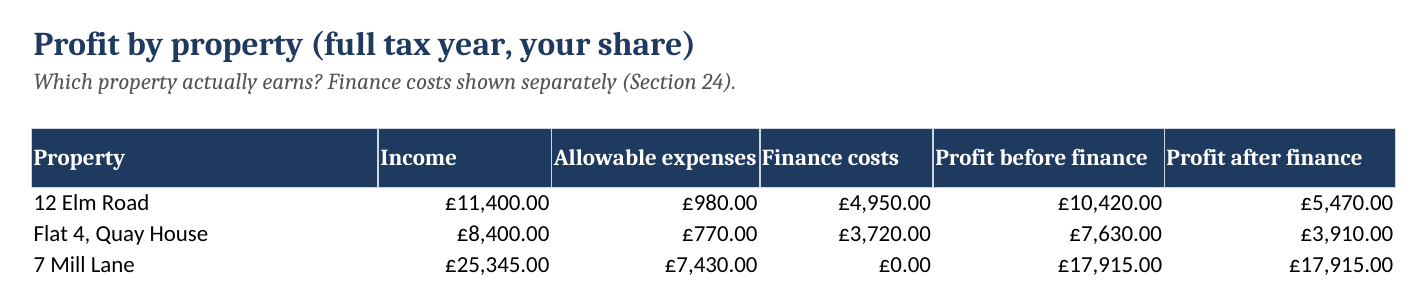
- Profit by property: see which property actually earns
- Mileage log: 45p / 25p applied automatically and added to travel costs
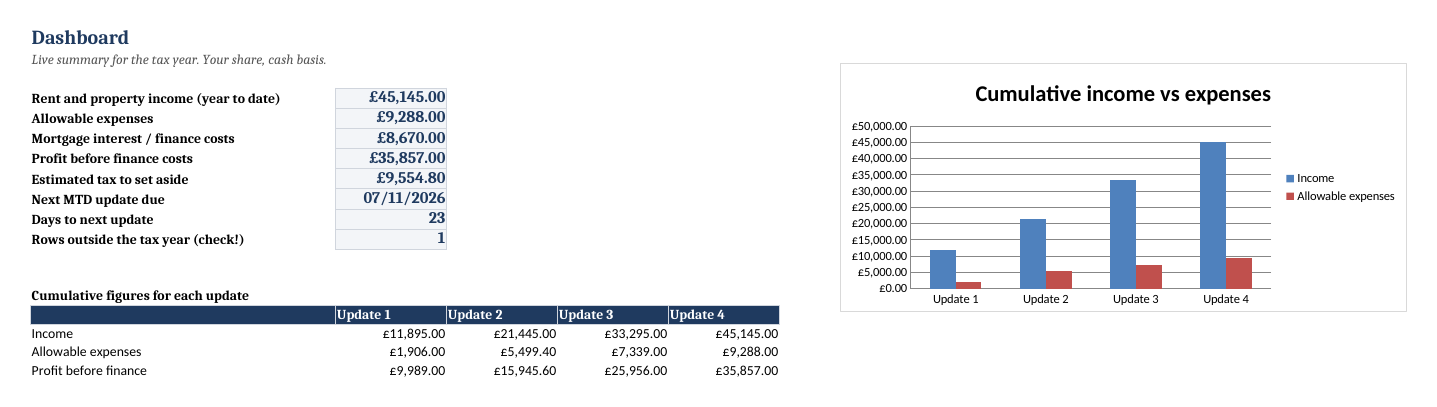
- Dashboard with your next deadline, plus a sample copy filled with 3 example properties
Worked example (from the sample file)
Three properties: one fully owned, one 50/50 with a spouse, and a 4-room HMO. Your share of rent to 5 October is £21,445, and allowable expenses are £5,499.40. That's what goes in Update 2. Mortgage interest of £4,335 is reported on its own line and isn't deducted. A £8,500 extension is logged as capital, so it stays out of the totals.
| Update | Period (cumulative) | Deadline |
|---|---|---|
| 1 | 6 Apr – 5 Jul 2026 | 7 Aug 2026 |
| 2 | 6 Apr – 5 Oct 2026 | 7 Nov 2026 |
| 3 | 6 Apr 2026 – 5 Jan 2027 | 7 Feb 2027 |
| 4 | 6 Apr 2026 – 5 Apr 2027 | 7 May 2027 |
Which software sends it? You need HMRC-recognised bridging software that reads your spreadsheet. Search GOV.UK for "find software for Making Tax Digital for Income Tax". Several options are free.
Who it's for
UK landlords with 1–20 residential lets who'd rather keep a spreadsheet than pay for an accounting subscription. That includes landlords in MTD now (over £50k), those joining in April 2027 (£30k), and anyone who wants a tidy SA105 in January. It's not for limited-company landlords, and the tax estimate doesn't cover Scottish rates.
Get it
VAT included where applicable · one-off · instant download
- Blank workbook + sample workbook (.xlsx)
- Google Sheets setup steps
- Free fixes and updates for 2026/27
- 14-day no-quibble refund
After payment you're taken straight to your download page. Stripe also emails a receipt.
FAQ
Does this submit my quarterly updates to HMRC?
No. It keeps your digital records and produces the cumulative figures in HMRC's property categories. To send them you link the spreadsheet to HMRC-recognised bridging software (GOV.UK's software finder lists several, some free). That's how HMRC lets landlords keep using spreadsheets under Making Tax Digital.
Why are the quarterly figures cumulative?
Because that's what HMRC asks for. Update 2 (due 7 November 2026) covers 6 April to 5 October and replaces Update 1, so it doesn't add to it. Spreadsheets that total each three-month block separately send the wrong numbers from the second update onwards. This workbook always gives year-to-date totals.
I'm not in MTD yet (under £50,000). Is it still useful?
Yes. You still need the same records for your Self Assessment return, and the SA105 tab lays them out box by box. MTD reaches £30,000 of qualifying income in April 2027 and £20,000 in April 2028, so you'll already be set up.
How does it handle mortgage interest (Section 24)?
Mortgage interest goes on its own line (residential finance costs, SA105 box 44). It is never deducted from profit, and the tax estimate applies the 20% basic-rate reduction instead.
I own a property jointly. Does that work?
Yes. Set your ownership % on the Properties tab. You enter the full amount and every total uses your share.
Does it work in Google Sheets / on a Mac?
Yes. It works in Excel 2010 or later, Microsoft 365, Excel for Mac, Google Sheets (File → Import → Upload) and LibreOffice. There are no macros. Step-by-step Google Sheets instructions are in the download.
What exactly do I get?
A ZIP containing the blank workbook, the same workbook filled in with 3 example properties so you can see it working, and a read-me with setup and Google Sheets steps. You download it straight after payment.
Is this tax advice?
No. It's a record-keeping tool. The tax estimate uses 2026/27 England, Wales and NI rates. Every rate is editable, and the limits are listed in the workbook. If your affairs are complicated, check with HMRC guidance or an accountant.
What's your refund policy?
If it isn't right for you, email us within 14 days and we'll refund you in full. You don't have to give a reason, and you can keep the file.
Free MTD guides
- Making Tax Digital for landlords 2026: what records you need
- MTD quarterly update deadlines 2026/27
- Self Assessment Prep Pack 2025/26 for sole traders (£14)
- More free small-business tools
Refund policy
Email chris@gptshopltd.com within 14 days of purchase and we'll refund you in full. You don't need to give a reason.